
Choosing the best kids tablets for educational games helps turn screen time into an enriching learning experience for your child. Finding a device that balances playful interactive content, parental controls, and rugged durability takes careful thought.
“Disclaimer: This post contains affiliate links. As an Amazon Associate, I earn from qualifying purchases at no extra cost to you.”

Navigating Modern Screen Time and Early Learning
Every parent wrestles with managing screen habits in our digital world. When used thoughtfully, touchscreen devices offer wonderful interactive opportunities that strengthen early literacy, math logic, and creative problem-solving skills. The goal is to choose devices that encourage active thinking rather than passive video scrolling.
Guidance from early childhood experts at the National Association for the Education of Young Children (NAEYC) highlights that high-quality digital media should promote active engagement and social interaction. Selecting the best kids tablets for educational games ensures your child accesses curated, age-appropriate apps designed by educators. High-quality devices give you total control over time limits, web access, and downloadable content.
Durable hardware also matters when little hands are involved. Accidental drops on kitchen tile or carpeted floors are inevitable during daily play. Buying the best kids tablets for educational games with protective bumper cases saves you from costly screen repair bills down the road.
Fire Kids vs. iPad: The Ultimate Parent Comparison
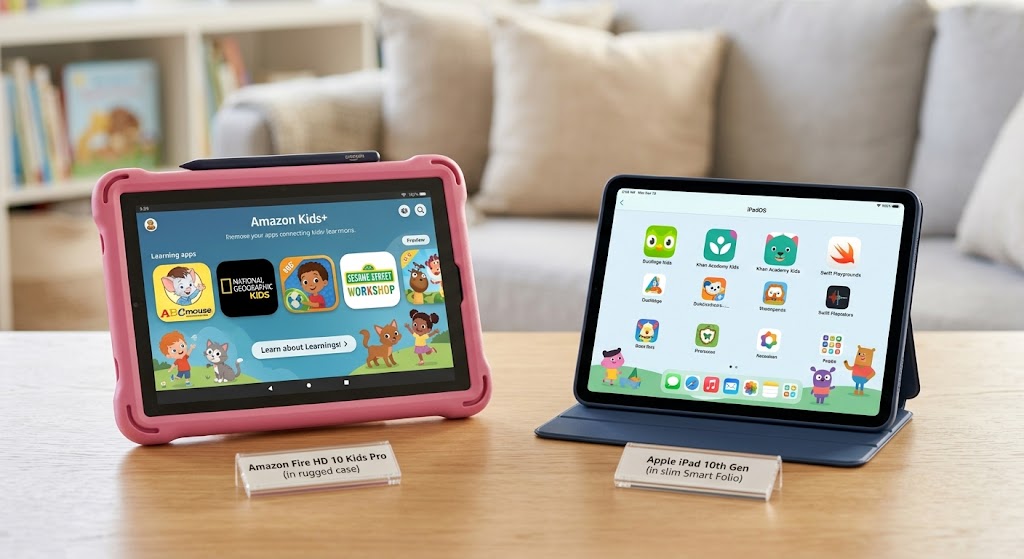
Choosing between an Amazon Fire Kids model and an Apple iPad comes down to your budget, software preferences, and your child’s age. Both platforms offer exceptional learning software, but their physical design and operating systems feel very different.
| Feature Category | Amazon Fire Kids Series | Apple iPad (Standard/Mini) |
| Price Point | Budget-friendly ($70 – $150) | Premium investment ($300 – $500+) |
| Included Accessories | Heavy-duty foam bumper case included | Case purchased separately |
| Default Software | Amazon Kids+ subscription included | App Store access (Paid/Free apps) |
| Parental Dashboard | Deep built-in controls & goal locks | Apple Screen Time controls |
| Durability & Warranty | 2-year worry-free replacement guarantee | Requires AppleCare+ for accidental damage |
| Best Target Age | Ages 3 to 8 years old | Ages 7 to 12+ years old |
To explore budget-friendly entry models with protective cases, check out the top-rated choices for the best kids tablets for educational games Fire models on Amazon.
Key Features in the Best Kids Tablets for Educational Games
Before buying a digital device, consider these important hardware and software factors to ensure a smooth, stress-free experience for your family.
1. Robust Parental Control Systems
Parental controls should allow you to lock screen time behind passcodes, set educational goals before entertainment unlocks, and block unvetted web browsing. The best kids tablets for educational games feature simple remote dashboards accessible directly from your smartphone.
2. Screen Quality and Eye Protection
Clear HD displays make reading stories and solving math puzzles easier on young eyes. Looking for the best kids tablets for educational games with blue-light filtering settings helps protect your child’s eyesight during quiet afternoon reading sessions.
3. Battery Life and Storage Capacity
Educational apps and interactive storybooks consume significant storage space. Aim for a device with at least 32GB of internal storage and a battery life that lasts 8 to 10 hours for long travel days.
You can browse high-capacity learning models by looking at the current deals for the best kids tablets for educational games 32GB on Amazon.

Detailed Breakdown of 7 Top Learning Devices
1. Amazon Fire HD 8 Kids (Best Overall for Toddlers)
This device strikes a perfect balance between price, size, and durability. Its bright 8-inch screen and thick foam case make it comfortable for little hands to hold during phonics games.
2. Apple iPad 10th Gen (Best for Long-Term Growth)
While pricier, the base iPad offers lightning-fast performance for complex coding apps, drawing software, and digital art tools. Selecting the best kids tablets for educational games from Apple’s lineup ensures the device grows alongside your child into their middle school years.
3. Amazon Fire HD 10 Kids Pro (Best for Older Elementary Kids)
Designed for ages 6 to 12, the Kids Pro series features a slimmer protective case and a web browser with built-in safety filters. It provides an ideal bridge between early childhood toys and full-featured adult tablets.
4. Apple iPad Mini 6 (Best Compact Travel Companion)
The iPad Mini’s lightweight design fits easily into backpacks for family road trips. Its high-resolution screen makes interactive science apps and storybooks look remarkably crisp and vibrant.
To compare protective cases and accessories for Apple devices, take a look at the selection for the best kids tablets for educational games iPad bundles on Amazon.
5. Amazon Fire 7 Kids (Best Budget-Friendly Starter)
If you want an affordable starter tablet for a preschooler, the Fire 7 provides basic offline game support and robust parental controls without breaking the bank.
6. Samsung Galaxy Tab A9+ (Best Android Alternative)
Samsung offers a sleek Android experience featuring “Samsung Kids” mode. This setting transforms the home screen into a safe, colorful playground with customizable time limits and fun learning characters.
7. LeapFrog LeapPad Academy (Best for Offline Early Literacy)
Unlike standard open-system tablets, LeapPad devices feature pre-loaded, educator-approved content focused on phonics, counting, and early writing without requiring continuous Wi-Fi access.
Health guidelines from pediatric experts at the American Academy of Pediatrics (AAP) emphasize creating clear media plans that balance digital play with outdoor physical activity and restful sleep. Utilizing the best kids tablets for educational games alongside healthy family screen rules fosters positive digital habits early in life.
To explore a wide array of rugged Android and learning devices, view popular listings for the best kids tablets for educational games cases on Amazon.

Healthy Screen Time Practices for Young Learners
Having the right tablet is only half the equation; establishing supportive home rules keeps digital play positive and educational:
- Create Tech-Free Zones: Keep tablets out of bedrooms during nighttime hours to encourage healthy sleep hygiene for growing bodies.
- Prioritize Co-Viewing: Sit down with your child during learning games to ask open-ended questions about what they are solving on screen.
- Set Educational Targets First: Use parental dashboards to require 30 minutes of reading or math apps before media apps unlock.
- Take Regular Eye Breaks: Encourage the 20-20-20 rule—every 20 minutes, have your child look at an object 20 feet away for 20 seconds.
Relying on the best kids tablets for educational games allows you to enforce these boundaries effortlessly through built-in timer settings.

Final Thoughts for Today’s Digital Parents
Investing in the best kids tablets for educational games opens up wonderful opportunities for interactive learning, creative expression, and early problem-solving. Whether you choose the rugged simplicity of an Amazon Fire Kids model or the powerful versatility of an Apple iPad, the right device aligns with your family’s budget and educational goals. Providing the best kids tablets for educational games gives your child a safe, guided gateway into the digital world. Choosing the best kids tablets for educational games ensures screen time stays rewarding, safe, and fun for years to come.
“To support early milestones with purposeful play, discover the [Best Educational Toys for 1-Year-Olds That Teach, Not Distract].”
Good article
thank you